

Device Parameter Range Analysis (DPRA) allows the user to specify a range for an input parameter to a device, and see the effects of variations within that range on the other nodes and pipes in the system. This is a steady-state feature, it is not available for Extended Period Simulations or Surge simulations. Below is how to run a DPRA:

1. Begin a Device Parameter Range Analysis
For instance, the user may specify a rated pressure range for a pump of between 110 psi to 290 psi: this is a range of 180 (290-110 = 180), so the program creates 9 divisions of 20 psi each, and analyzes the entire model 9 times, once for each division. The user then can see the effects of each pressure division within the graph for any node or pipe in the system, save for the initially selected device (in this case, the pump) for which data are not available.
In the example below, the user has input a range of initial stem positions for an active valve, AV-1: the position range is from 0.15 to 0.35: in other words, the valve can be between 15% open and 35% open. This is a range of 0.2, or 20% open. The program creates 9 divisions within this range. Clicking on the graph for a nearby node (J-7) shows the effect of varying the valve stem position on the pressure at that node.
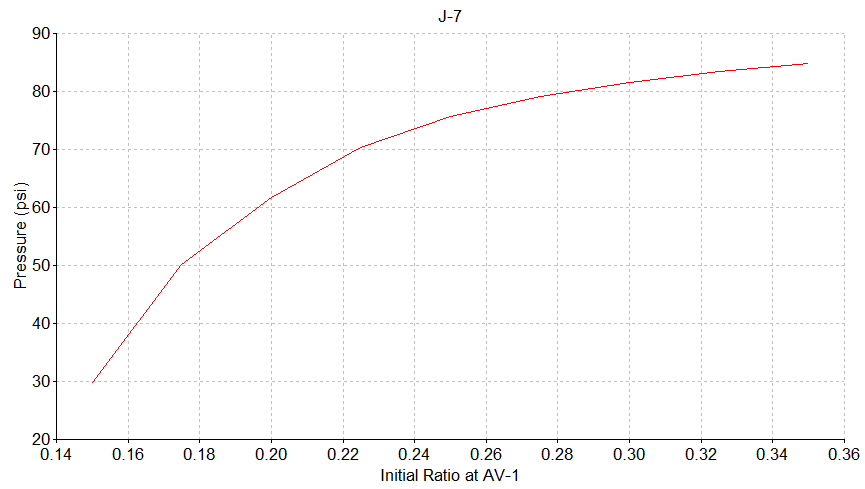
2. Device Parameter Range Analysis for an Active Valve: Graphical Output for a Nearby Node

3. Device Parameter Range Analysis for an Active Valve: Tabular Output for a Nearby Node
Output from the DPRA can also be viewed within the Analysis Report: after loading the report, click on the drop-down list on the right-hand side of the report: each of the nine parameter divisions is represented as a separate case. Viewing the data in this manner shows output for all pipes and nodes in the model save the initially-selected node, not just for a single node or pipe.

3. Device Parameter Range Analysis for an Active Valve: Report Output (Entire Model) for Each of 9 Divisions
Nodes used for DRPA analysis must be two-sided nodes and have exactly one pipe connected to each side: users can create a temporary file with a manifold if too many pipes exist at a given node.

